Audit-grade financial statement ingestion — built for reconciliation, not OCR demos.
Upload PDF. Validate against balance checkpoints. Export clean data. Pay only for verified transactions.
For accounting teams, platforms, and operators who can’t afford false confidence.
- Catches silent extraction errors (decimals, missing rows, swapped debits/credits)
- Handles multi-month / multi-statement PDFs
- Exports 4-column accounting-ready format (Date, Description, Debit, Credit)
Don’t Reconcile,
Every row carries a computed running balance alongside the bank’s stated balance. Divergence is visible at the row — not after the export.
See it in actionSee it in action
A narrated run through the full workflow — statement upload, balance validation, the reconciliation UI, and audit-ready export.
CRA meal allowances for
long-haul truck drivers
Your drivers may be leaving $8,000–$12,000/year in unclaimed CRA meal deductions on the table. NovaHaul Tax processes your ELD data and delivers a fully audit-ready TL2 workbook — no manual calculation required.
Why reconciliation matters
Speed is easy. Trust requires verification.
Most document extraction tools optimize for confidence scores — not accounting correctness. Silent errors often pass OCR checks undetected, only surfacing later as reconciliation breaks, close delays, or audit risk.
NovaConvert treats reconciliation as a first-class constraint, not an after-the-fact cleanup step.
A highlighted “9.17” was read as “9017” by a mainstream ingestion tool. NovaConvert flags the resulting balance break so the error is obvious before posting.
Make the invariant the authority.
A closed-form check that every bank statement already satisfies — used as the oracle, not the LLM.
The accounting identity is a free, deterministic check:
Every bank statement in existence satisfies this equation. If the extracted transactions don’t, the extraction is wrong — full stop.
Making it the final authority in the pipeline — rather than the LLM — inverts the usual problem. Instead of trying to make the model accurate, you make the architecture tolerant of the model being wrong.
The deterministic check can always veto. That single inversion is what the rest of the system is built around.
How NovaConvert works
Extract
AI-assisted parsing pulls transactions from bank and credit-card statement PDFs, including scanned documents.
Reconcile
Balance continuity and delta checks verify correctness using accounting invariants — before you trust the data.
Export
Download clean CSV or Excel in 4-column accounting format (Date, Description, Debit, Credit).
Reconciliation UI — audit before you post
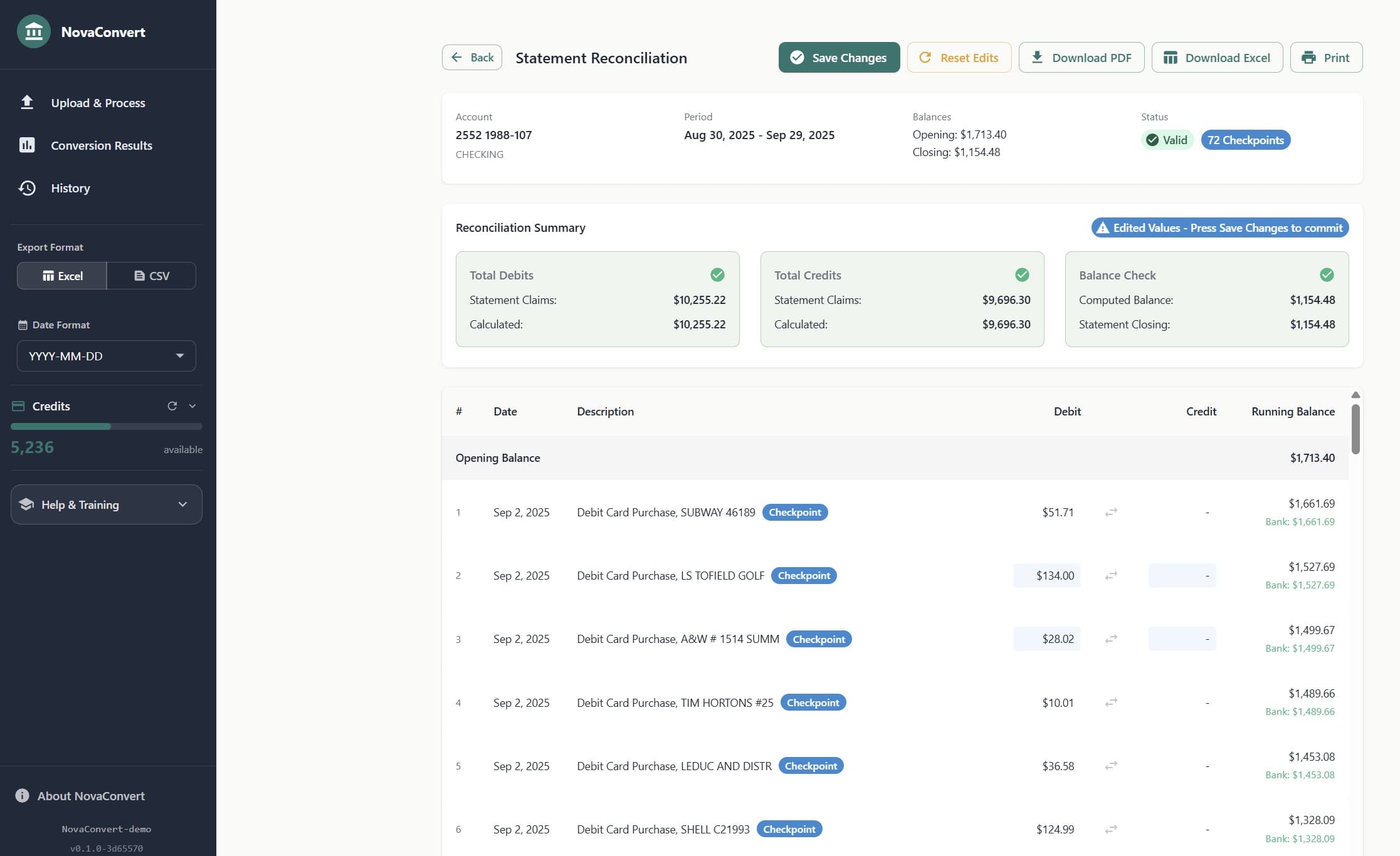
- Shows opening/closing balances vs computed
- Highlights inconsistencies
- Lets you adjust amounts and re-run deltas
- Download the exact PDF segment for the statement under review
A reconciliation page, built as a spreadsheet.
FIRE flags the mismatch; the UI is where it gets resolved. A cell-addressable grid, live balance recomputation on every edit, the bank’s stated closing beside the computed one. When they match, the invariant turns green.
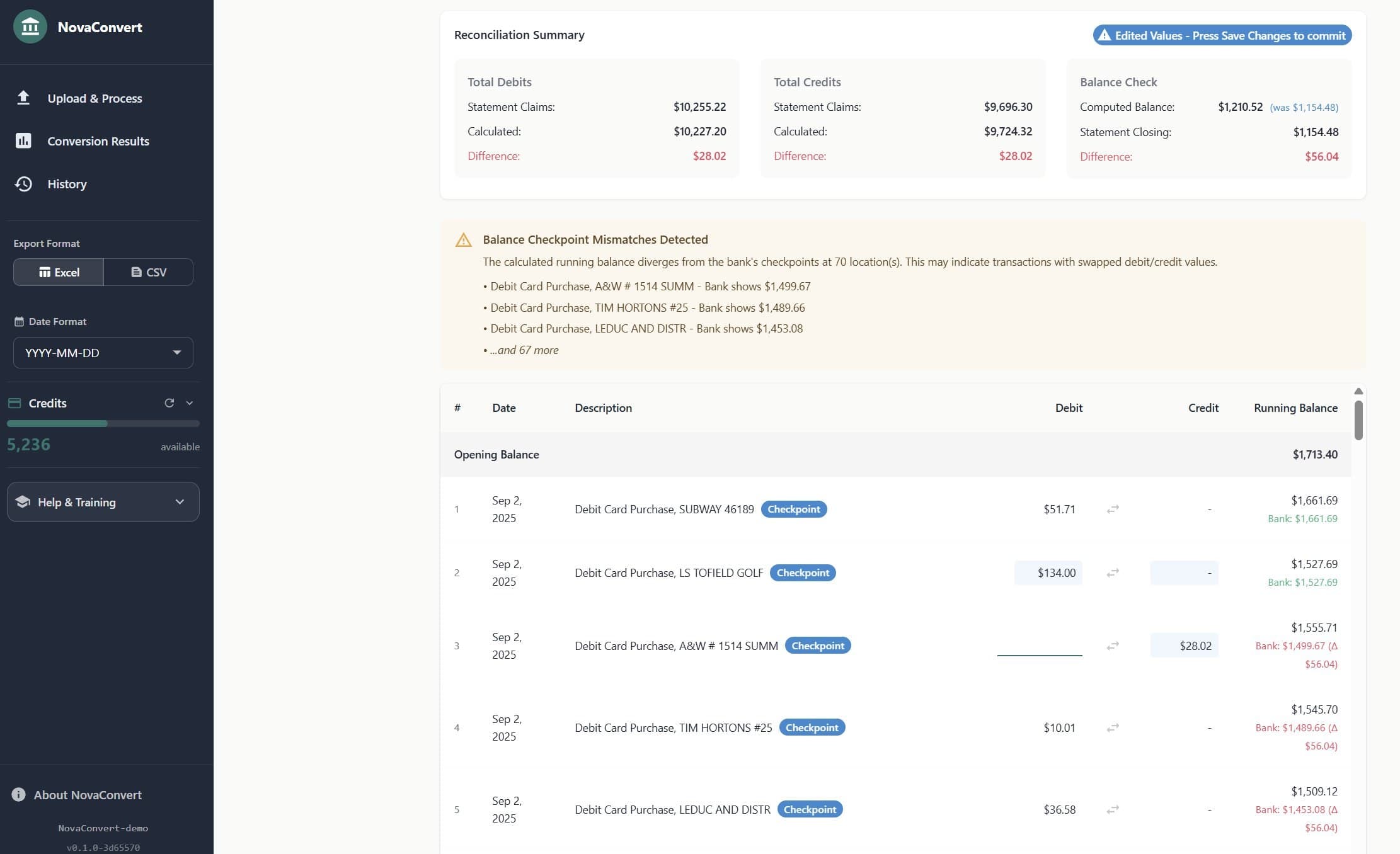
FIRE doing its job on a real statement. The amber card lists specific merchants where the bank’s running balance diverges from the extracted one — the rows a bookkeeper needs to look at, ranked and named.
| Date | Description | Debit | Credit | Balance | |
|---|---|---|---|---|---|
| R1 | Feb 18 | Deposit · payroll | — | 2,450.00 | 8,450.00 Bank: 8,450.00 |
| R2 | Feb 19 | POS · CO-OP GAS | 87.42 | — | 8,362.58 Bank: 8,362.58 |
| R3 | Feb 20 | INTERAC e-Transfer · inbound | 150.00 | — | 8,212.58 Bank: 8,512.58 |
| R4 | Feb 21 | POS · TIM HORTONS | 15.26 | — | 8,197.32 Bank: 8,497.32 |
| R5 | Feb 22 | POS · MCDONALD'S | 18.00 | — | 8,179.32 Bank: 8,479.32 |
See it on your own statements
Request a demo and we’ll walk you through the full workflow on a real statement — multi-statement detection, balance validation, reconciliation UI, export.
Even shoeboxes get sorted.
A scanned PDF. Multiple monthly statements, out of order, some spanning page breaks. Most tools can’t handle it. NovaConvert sorts it automatically — before extraction even starts.
and groups pages by statement boundary.
Two passes. The cheap one runs on everything.
Lightweight OCR reads only the header region of each page — bank name, account number, date range. That thin text stream is sent to Claude Sonnet, which classifies every page and groups them by the statement they belong to. The expensive full-extraction model never sees pages from the wrong statement, and never wastes cycles deciding where the boundaries are.
The longest step in the job, automated.
Most extraction tools assume one statement per file. For accounting firms handling shoebox clients, scanned archives, or bulk batch uploads, manually splitting PDFs is often the longest step of the job — and the most thankless.
Three stages. One authority.
With statement boundaries already resolved, each statement flows through three stages. Narrow contracts, testable in isolation. Swappable AI, deterministic core, human finish.
Extract
For each statement identified by boundary detection, a language model produces a candidate set of transactions — dates, amounts, descriptions, running balances. Gemini, Claude, or Grok behind a factory.
Reconcile
FIRE enforces the accounting identity. When values fail the check, it tests alternate interpretations and commits only the one that balances. Every correction is audit-logged.
Review
Anything the pipeline can't resolve surfaces in a reconciliation UI — the PDF alongside the transactions, live balance recomputation, one-click sign flips.
Who it’s for
Bookkeepers & Accountants
Stop discovering errors after posting.
- Convert client statements without manual data entry
- Verify extraction correctness before posting to GL
- Handle multi-month PDFs and scanned documents
Platforms & Close Automation Teams
Eliminate a class of upstream risk before it reaches close.
- Integrate reconciliation-aware ingestion into existing workflows
- Reduce audit risk from silent extraction errors
- Improve close confidence with deterministic validation
What NovaConvert is not
- Not a generic OCR tool
- Not a speed-first extraction demo
- Not probabilistic "best guess" parsing
NovaConvert is designed for correctness under audit conditions, where silent errors are worse than visible failures.
If your output has a deterministic invariant, make the invariant the authority and let the models propose. Don’t try to make models more accurate — make your architecture tolerant of them being wrong, using math they can’t argue with.
Simple pricing
Pay per verified transaction. No subscriptions. Credits never expire.
Starter+
500 transactions
$0.05 CAD/tx · Save 20%Credits never expire
Pro
2,000 transactions
$0.038 CAD/tx · Save 40%Credits never expire
Firm
10,000 transactions
$0.033 CAD/tx · Save 50%Credits never expire
You only pay for transactions you download. If it doesn’t reconcile, don’t download it.
Need dedicated infrastructure?
Private VPS deployment for compliance-sensitive or high-volume clients.
- • Isolated server (not multi-tenant)
- • Custom subdomain
- • Priority support
$150 setup + $20/month + same credit pricing
Get started
Request a demo
Email us and we'll walk you through the full workflow on your own statements
Contact us
Ready to buy? Reach out and we'll set up your account
Start processing
Buy credits and begin converting statements
Common questions
When am I charged?
Only when you download. Upload, process, and review for free. Pay per transaction when you export.
What counts as a transaction?
Each line item — deposits, withdrawals, transfers, fees. Opening/closing balance lines don't count.
Do credits expire?
No. Buy a bundle, use it whenever.
What if extraction fails?
You don't pay. If it doesn't reconcile, don't download it.
What banks do you support?
Any bank. The AI adapts to each format automatically.
Is my data secure?
Yes. Encrypted transit, secure authentication, data isolation between accounts. Your statements are never used for AI training. For maximum security, private VPS deployment is available.
What's the difference between Standard and Private?
Standard runs on our multi-tenant platform — fast, secure, no setup. Private gives you a dedicated server for compliance requirements or preference. Same pricing for credits, Private adds $150 setup + $20/month.
What formats do you export?
Excel (.xlsx) and CSV.
See it work on your own data
Request a demo. We’ll extract a real statement, verify it, and show you exactly what’s correct.