DocuClipper vs NovaConvert: Same Statement, Different Results
We processed the same bank statement through both tools. DocuClipper missed ~$2,889 in transactions and produced silent errors that would have broken reconciliation.
See the side-by-side screenshots. The errors speak for themselves.
The Errors We Found
We ran the same June 2025 TD bank statement through DocuClipper and NovaConvert. Here’s what DocuClipper missed — errors that would have gone undetected until reconciliation failed.
Total errors found in one month’s statement: ~$2,889 in missed or incorrect transactions, plus a date parsing error that corrupts your data.
Below are the actual screenshots from both tools.
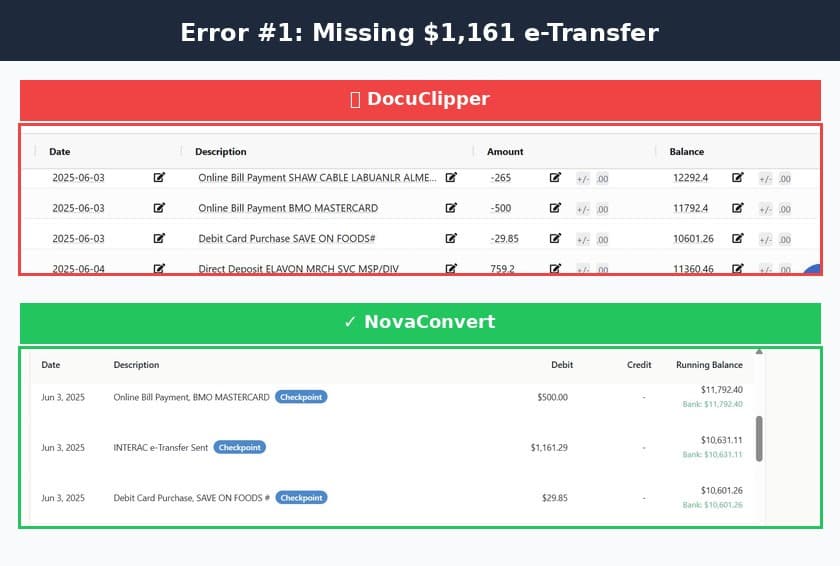
DocuClipper completely dropped this INTERAC e-Transfer from its output. The transaction simply doesn’t exist in their extracted data — a silent error that would have caused a $1,161.29 reconciliation discrepancy.
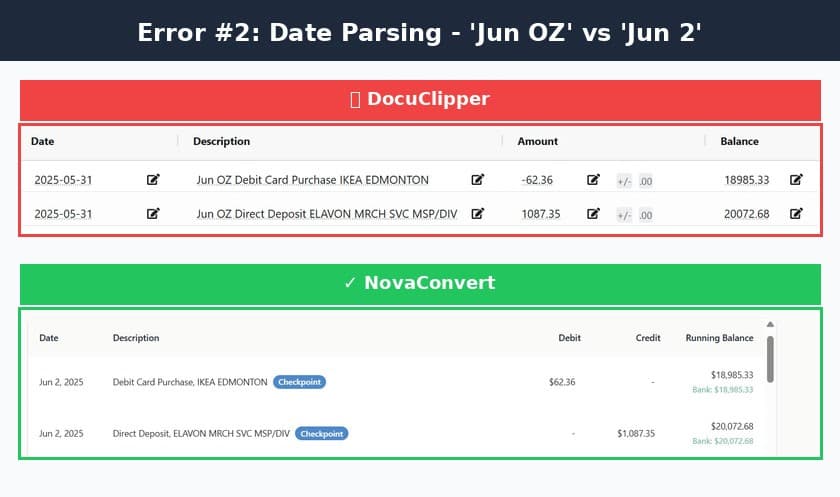
DocuClipper’s OCR misread "Jun 2" as "Jun OZ" — turning a valid date into corrupted data. This isn’t just a cosmetic issue; it breaks date sorting, filtering, and any downstream processing that depends on valid dates.
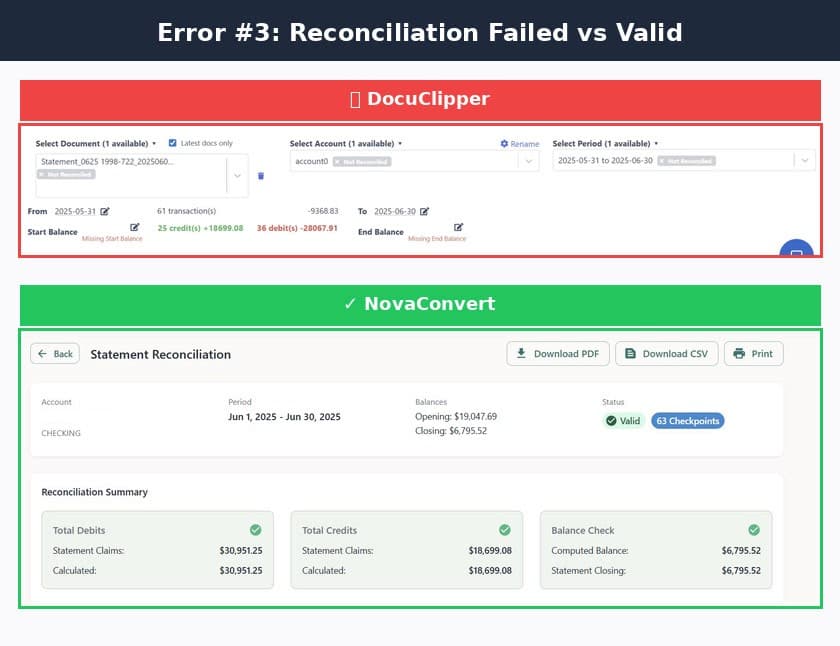
DocuClipper shows "Not Reconciled" with missing balance data. NovaConvert shows "Valid" with 63 balance checkpoints verified. One tool hopes the numbers are right. The other proves it.
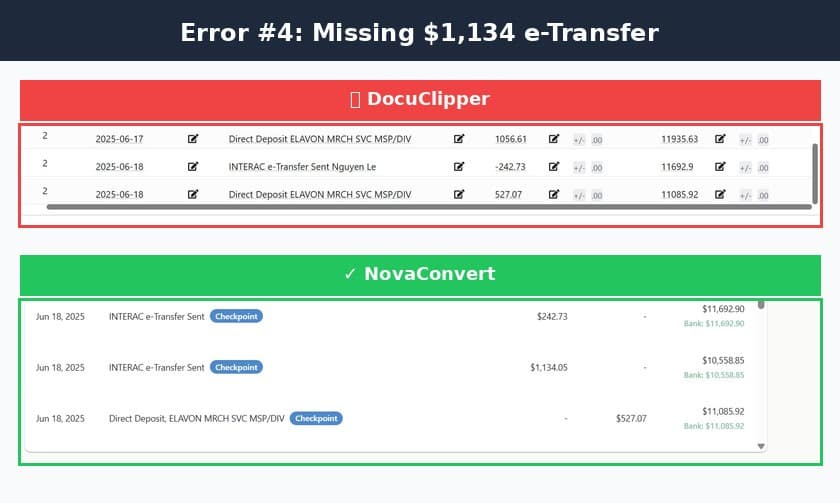
Another dropped transaction. This pattern of silently missing INTERAC e-Transfers suggests a systematic issue with DocuClipper’s extraction logic — not a one-off glitch.
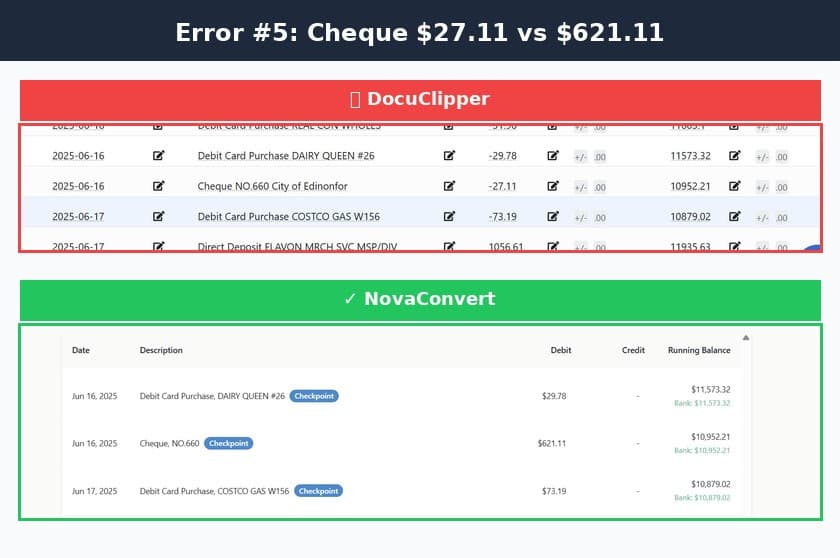
DocuClipper extracted $27.11 instead of $621.11 — a $594 error. The insidious part? The running balance was still correct, so this error would pass any balance-only validation. Only transaction-level verification catches silent amount errors like this.
Error Summary
One month. One statement. Five errors totaling ~$2,889 in discrepancies.
| Error | DocuClipper | NovaConvert | Impact |
|---|---|---|---|
| Missing INTERAC #1 | Dropped | Captured | $1,161.29 |
| Date parsing | "Jun OZ" | Correct | Data quality |
| Reconciliation | Failed | Valid | Trust |
| Missing INTERAC #2 | Dropped | Captured | $1,134.05 |
| Cheque amount | Wrong | Correct | $594.00 |
Why This Happens
The fundamental difference is in what each tool optimizes for.
DocuClipper
Uses OCR + template matching. Optimizes for speed and “confidence scores.” Errors pass silently if the OCR is confident — even when it’s wrong.
NovaConvert
Uses the FIRE engine — validates every transaction against balance checkpoints. Errors are caught before export, not discovered during reconciliation.
Adding Insult to Injury: You Pay for Those Errors
DocuClipper charges when you process. NovaConvert charges when you download verified results.
DocuClipper
Pay-Per-Page
- Charged per page processed
- Credits consumed at processing
- Re-processing costs extra
- Pay even if results need correction
NovaConvert
Pay-Per-Transaction
- Only charged for downloads
- Review results first — verify it's correct
- If it doesn't reconcile, no charge
- Pay only for validated output
“Why pay before you know the data is right?”
The Bottom Line
- DocuClipper extracts data and hopes it's right
- NovaConvert extracts data and proves it's right
- With DocuClipper, you pay for pages — whether they're correct or not
- With NovaConvert, you pay for transactions — only after verification
Test It Yourself
Request a demo and we’ll run the same statement through both tools. See which one reconciles — just results you can trust.